

Learning how to build ChatGPT workspace agents for business automation starts with one important distinction: a workspace agent is designed for shared, repeatable work, not one-off chat. OpenAI announced workspace agents on April 22, 2026, describing cloud-running, Codex-powered agents that can connect tools, files, memory, schedules, Slack, approvals, and analytics. OpenAI’s launch announcement also positioned them as shared workflows for teams.
| Capability | Business meaning | Evidence |
|---|---|---|
| Shared agents | Teammates can test, use, and govern one workflow | OpenAI launch post |
| Connected tools | Agents can work across approved apps, files, MCPs, and skills | Workspace Agents guide |
| Automation channels | Schedules, Slack, and API triggers support recurring execution | Workspace Agents guide |
| Controls | Permissions, approvals, constraints, and monitoring limit risk | OpenAI release notes |
What changed with ChatGPT workspace agents?
The April 22 launch moved ChatGPT agents toward persistent business workflows. A normal chat answers a request in one conversation. A custom GPT packages instructions and knowledge. A workspace agent adds shared ownership, connected systems, scheduled execution, and operational controls. That difference matters when a process repeats across a team, such as lead qualification, report generation, software review, or internal Slack support.
OpenAI’s May 22, 2026 Enterprise and Edu release notes state that workspace agents became generally available in Business, Enterprise, and Edu. However, official pages use different availability labels: the launch post describes a research preview in one passage, while the current Business page still uses research-preview language. Check workspace admin settings before planning a rollout. The May 22 release notes confirm the GA wording and expanded administrative visibility.
For teams assessing implementation effort, begin with workflow analysis and scope definition through project consultation. The right starting point is one repeatable process with a clear owner, approved data sources, and a measurable output.
Design the workflow before opening the builder
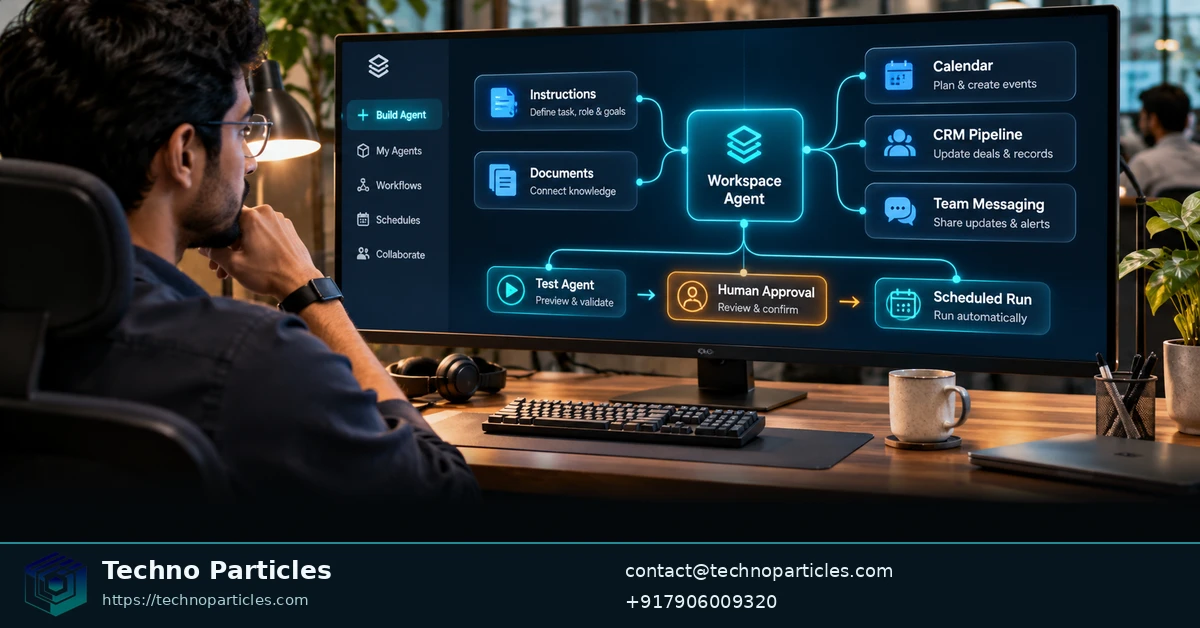
Use a trigger-process-tools model to turn a business task into an agent specification. OpenAI Academy describes the trigger as the event that starts work, the process as ordered reasoning and actions, and tools as approved sources or systems. This structure prevents a broad request such as “handle sales operations” from becoming an untestable agent.
Define inputs, actions, and output
Write the trigger first: a scheduled time, Slack request, incoming API call, or human assignment. Then list required inputs, such as a calendar, knowledge base, CRM record, document, or form. Separate skills from tools. Skills describe reusable procedures; tools provide access to apps, files, web search, or custom MCP servers. The OpenAI Academy workspace-agent model recommends making these relationships explicit.
Specify the output in a format another person or system can use. Examples include a qualified-lead summary, a meeting-preparation brief, a report with cited evidence, or a routing decision. Add acceptance criteria: required fields, source coverage, escalation conditions, and maximum response time. For complex delivery planning, AI and automation services can help translate workflow requirements into a bounded implementation scope.
Place human review where risk begins
Mark every action that changes external data, sends communication, approves spending, or exposes sensitive information. Keep those actions behind explicit approval during early testing. OpenAI’s workspace-agent Cookbook example shows a practical build flow: connect relevant knowledge, define skills, add memory where useful, test the result, then schedule or share it.
Choose one repeatable workflow with a clear owner and measurable result. Build its private draft first. Expand tools or audience only after the agent produces the required output consistently.
Connect tools and trigger business automation
Once the workflow has a defined output, connect only the systems it needs. Workspace agents can use approved apps, uploaded files, custom MCP servers, reusable skills, memory, web search, Slack channels, schedules, and API triggers. The Workspace Agents guide documents these connection options and the testing flow before an agent is shared.
Choose authentication that matches ownership
End-user authentication is appropriate when each person should access data through their own permissions. An agent-owned connection is better for a shared workflow that must run without a person present, but OpenAI recommends using a narrowly scoped service account and least privilege. This distinction matters for scheduled reports, shared Slack support, and cross-tool processes: the identity behind the connection determines what the agent can see and change.
Schedules and Slack support human-facing automation. API triggers support application-driven execution, but they should be treated as job dispatch rather than a normal synchronous function call. OpenAI’s Trigger workspace agent runs documentation states that a published run is queued asynchronously and returns HTTP 202 Accepted. Direct retrieval of the API-triggered response is not currently available; beta run-status polling can be used to monitor execution. Use an idempotency key when the calling system may retry a request, so duplicate dispatches can be controlled.
curl -X POST "https://api.openai.com/v1/workspace/agents/{agent_id}/runs" \
  -H "Authorization: Bearer $ACCESS_TOKEN" \
  -H "Content-Type: application/json" \
  -H "Idempotency-Key: $IDEMPOTENCY_KEY"
Bound tools before adding scale
Start with read access to the smallest useful set of apps and files. Add memory only when retaining context improves the workflow, and define what belongs in that memory. Skills should describe repeatable procedures; tools should provide the controlled access needed to perform them. For teams planning a larger cross-system build, application development services may help map API triggers, authentication, and failure handling into an implementation plan.
Map each trigger to an execution owner
Different triggers imply different operating expectations. A scheduled run should have a fixed reporting window, a defined data snapshot, and an identified recipient. A Slack-triggered run should specify which channels or users may invoke it and what information can be returned in that conversation. An API-triggered run should be connected to the calling system’s retry and status-handling logic.
For each channel, document the expected input and the handoff after completion. A human request may need a readable answer, while a scheduled workflow may need a structured report delivered to a team channel. An application trigger may need an execution identifier that the calling system records for monitoring. This mapping keeps one agent from serving incompatible use cases without clear boundaries.
Custom MCP servers and connected apps should expose only the operations required by the workflow. For example, a lead-qualification agent may need to read approved customer records and write a review status, but it does not automatically need broad access to every sales object. Reusable skills can define the sequence for checking records, applying qualification rules, and formatting the result, while the connected tools handle access to the underlying systems.
Test each connection with representative, non-sensitive data before adding schedules or sharing the agent widely. Check whether missing records, expired authentication, duplicate requests, and partial tool failures produce an understandable handoff. Teams that need to connect several business systems can use project consultation for workflow and integration planning while keeping the agent’s first version narrowly scoped.
Prepare the handoff between systems
Before publishing, record the trigger source, authentication owner, tools used, expected output, approval points, and retry behavior. This short operational specification gives administrators a practical basis for reviewing access and gives developers enough context to integrate the agent without treating it as an opaque chatbot.
Define the run contract before publication
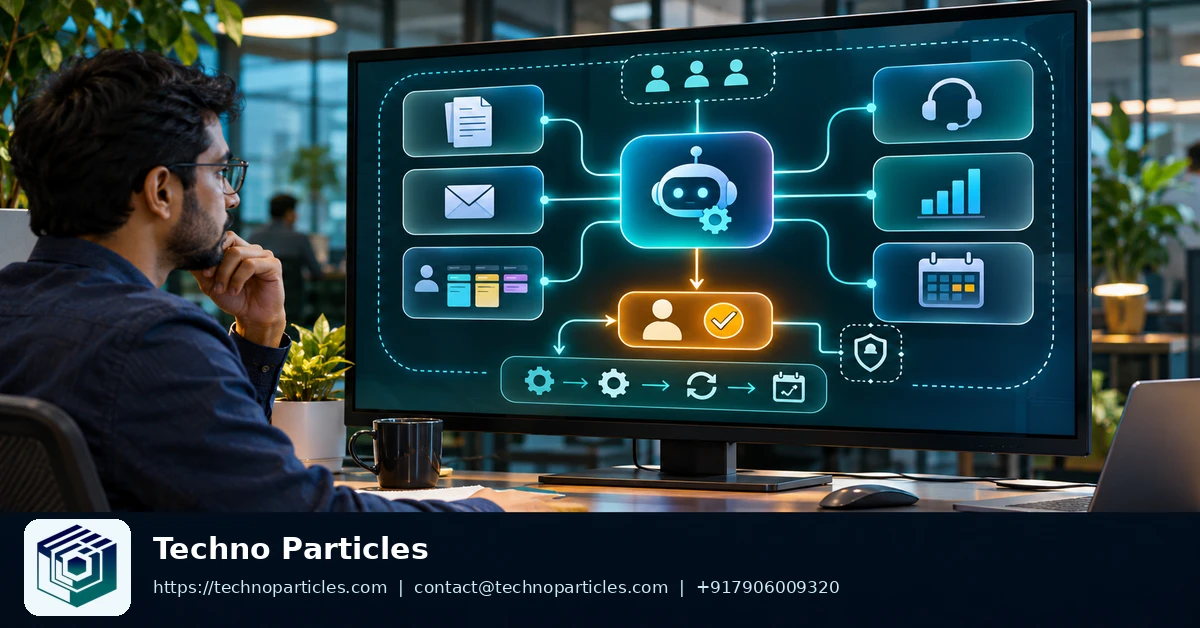
API automation works best when the calling system knows exactly what starts a run and what happens afterward. Define required input fields, authentication ownership, the agent identifier, and the destination for status updates. Keep this contract separate from the agent’s internal instructions.
A published workspace agent run is queued through the API. The caller should therefore record its idempotency key and execution reference before treating the request as accepted. If the caller retries after a timeout, reuse the same idempotency key when the same business event is being submitted. This helps prevent duplicate dispatches.
Build the integration around state changes, not an immediate answer. The official trigger documentation describes HTTP 202 Accepted for queued runs and beta status polling. The calling application can store the run identifier, poll according to its own retry policy, and route completed or failed states to the right queue. Do not design the integration around directly fetching the agent’s generated response.
Separate workflow output from user display
One agent may serve several channels, but each channel needs a defined handoff. A Slack-triggered run may need a concise team-facing message. A scheduled run may need a report delivered to a fixed audience. An application-triggered run may need a machine-readable completion record for downstream processing.
Write these output expectations before connecting more tools. Define which fields are mandatory, which failures require human review, and which results may be posted automatically. This makes testing measurable and limits accidental reuse of an output format in the wrong system.
For multi-system projects, application integration planning can help map authentication, retries, and handoffs before production rollout. Keep the first contract narrow. Add channels only when each one has a clear owner and tested failure path.
Make the first automation decision small
Use a workspace agent when a workflow repeats, crosses approved business tools, and benefits from shared or scheduled execution. Choose deterministic automation when rules, inputs, and outputs are fully fixed and every exception can be handled outside the workflow. This decision rule keeps flexible agent behavior focused where judgment and coordination matter, while predictable jobs remain easier to test as conventional integrations.
The strongest starting point for how to build ChatGPT workspace agents for business automation is not a broad company assistant. It is one contained process with a visible business owner. Choose work that already follows a recognizable pattern, such as preparing an internal report, routing qualified requests, or assembling information for a review. The first version should have one clear trigger, a small approved tool set, a defined output, and an approval gate before consequential changes.
Next, choose one low-risk workflow and build a private draft with read-only tools and approval gates. Write the expected input and output in plain language before adding schedules, Slack access, or API triggers. Use representative non-sensitive data during testing. Confirm that the draft produces a useful result, stops when required information is missing, and sends uncertain cases to a named reviewer.
Keep the initial draft narrow enough that one person can inspect every connected app, instruction, file, and output. After the workflow proves useful, expand one boundary at a time: add a second tool, introduce a controlled write action, or schedule recurring execution. Each change should have a clear owner and a measurable reason. This creates a practical path from an experimental agent to a governed business workflow without turning the first build into an organization-wide dependency.

Leave a comment
Your email stays private. You can see your comment immediately on this browser. Others see it after approval.