

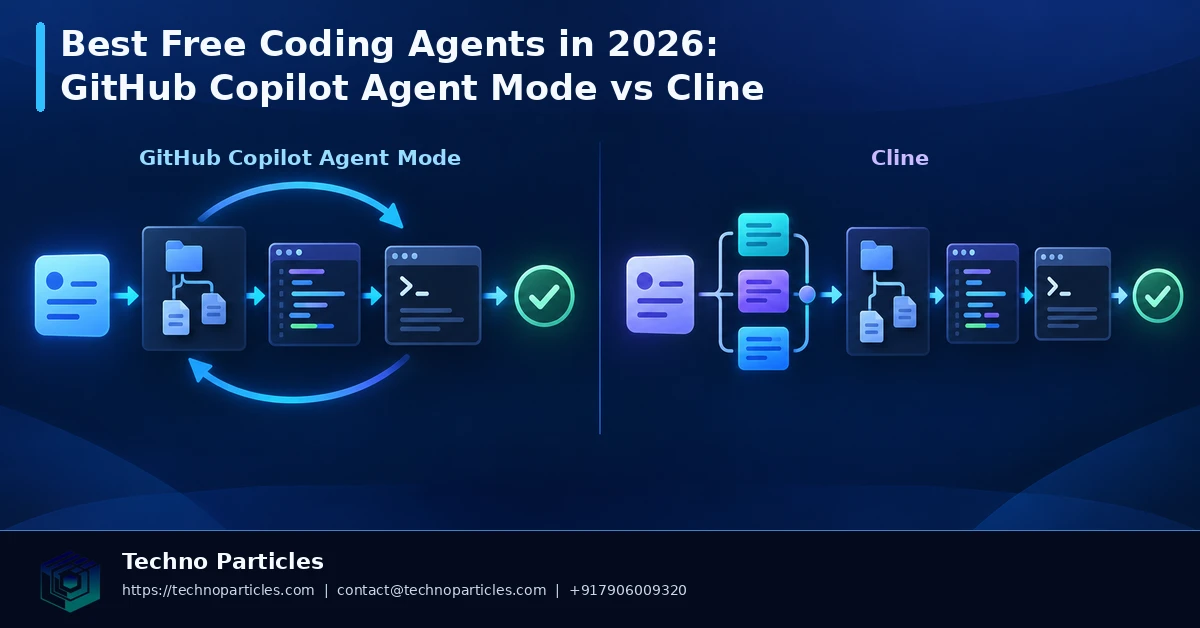
The search for the best free coding agents in 2026 now comes down to more than autocomplete. GitHub Copilot agent mode and Cline can accept a high-level development task, inspect a project, edit files, run commands, and revise the result. The important difference is how much control each tool gives you, where the work runs, which models you can use, and what “free” really includes.
GitHub Copilot agent mode: a connected GitHub workflow
GitHub presents Copilot agent mode as an IDE feature for delegating multi-step coding tasks. It can make changes across a repository, execute commands, and iterate, while command approval is normally required. GitHub’s October 2026 documentation also notes that agent interactions consume AI Credits. Copilot Free is limited for individual accounts, with GitHub listing up to 2,000 inline suggestions and 50 premium requests per month; limits can vary by plan and account type.
Recent GitHub updates added a model picker, self-review, security scanning, custom agents, and CLI handoff to the Copilot coding agent. GitHub later renamed coding agent to Copilot cloud agent and added branch work without an obligatory pull request, alongside implementation-plan generation. This makes Copilot attractive for teams already using GitHub issues, branches, reviews, and security workflows.
Cline: more control over tools and providers
Cline is an open-source coding agent offered as a VS Code extension, CLI, desktop app, and SDK. Its Plan and Act modes separate analysis from execution, while approvals, checkpoints, MCP servers, browser tools, and configurable model providers give developers finer control. Installation may be free, but inference can still create provider charges, and no universal free-compute allowance is verified.
For businesses planning a custom application development workflow, that flexibility can matter more than a bundled quota. The practical comparison is therefore setup, privacy, GitHub integration, model choice, approval controls, and total usage cost—not an unsupported claim that one tool wins every project.
Best free coding agents in 2026: which workflow fits?
Choosing between Copilot agent mode and Cline starts with the repository, not the marketing label. If your team already manages work in GitHub, Copilot reduces the distance between an issue, a branch, an implementation plan, and review. Its newer model selection and cloud-agent workflow can suit developers who want a connected process with familiar permissions and security checks.
That convenience comes with account and quota considerations. Copilot Free is not unlimited agent access: GitHub documents monthly limits, premium requests, and AI Credit consumption, and those limits may differ across individual, organization, and enterprise accounts. Before assigning a large refactor, check the plan currently attached to your account and confirm whether the requested model or agent action uses a metered allowance.
When Cline may be the better fit
Cline is more attractive when you want to choose the model provider, inspect each proposed action, or adapt the agent to tools outside a standard GitHub workflow. Plan mode can help turn a vague request into an implementation outline before Act mode changes the project. Checkpoints provide a recovery path, while MCP servers and browser capabilities can extend the agent’s working environment when those tools are configured appropriately.
That flexibility also shifts responsibility to the developer. You may need to configure a provider, manage API credentials, monitor token usage, and decide which files or commands should be approved. A free extension does not automatically mean free inference. For teams building a structured application development workflow, the cost of setup, review time, model calls, and maintenance should be assessed together.
A fair comparison test
Use both tools on the same small repository task: ask each to explain its plan, identify files, propose tests, and implement a limited change. Record approval prompts, edits requiring correction, model usage, test quality, and the time needed to review the diff. This produces a project-specific comparison without pretending that one agent is universally superior.
How to evaluate the best free coding agents in 2026
A useful trial should measure more than whether the final code runs. Start with a repository that has a clear test command and a small, reversible objective, such as adding validation to one form or improving a single API endpoint. Ask Copilot agent mode and Cline to describe the intended files, implementation steps, and tests before allowing changes. This makes their planning behavior visible and creates a safer baseline for comparison.
Next, review the execution process. Note how often each agent requests approval, whether it explains commands clearly, and how easily you can stop or revise an action. Copilot’s GitHub-connected workflow may be convenient when issues, branches, security checks, and reviews already form the team’s daily process. Cline’s Plan and Act separation may be more useful when a developer wants to inspect a proposal before execution or select a particular model provider.
Check privacy, permissions, and usage cost
Before using either agent on production code, examine repository permissions, command access, model settings, and the handling of sensitive files. Keep secrets outside the working context where possible, use a test branch, and require review for dependency changes, database migrations, authentication logic, and shell commands. These controls matter more than a simple free-versus-paid label.
Copilot users should check the active plan, premium-request allowance, and AI Credit usage because GitHub documents limits that vary by account type and plan. Cline users should identify the selected provider and determine whether model calls are billed through an API or another account. For teams creating a maintainable, SEO-aware digital product, the realistic budget includes inference, developer review, testing, configuration, and ongoing maintenance.
Match the agent to the repository
Choose Copilot when GitHub integration and a guided team workflow are priorities. Choose Cline when provider flexibility, open-source inspection, and granular tool approval matter more. In either case, keep the first assignment narrow, inspect the diff, run tests independently, and expand permissions only after the agent behaves predictably.
What “free” really means for coding agents
The phrase “best free coding agents in 2026” needs careful interpretation. Free access may describe the extension, desktop application, or account tier, while the underlying model calls can still be limited or billed. Copilot Free provides a documented allowance, but agent interactions and premium models may consume account credits or requests. Cline can be installed without a software license fee, yet the selected provider may charge for inference. Compare the complete monthly path: subscription, API usage, developer time, and review effort.
Build a controlled evaluation workflow
For a reliable decision, create a short test matrix covering planning, implementation, debugging, and documentation. Give both agents the same repository snapshot and the same acceptance criteria. Ask them to modify one isolated feature, add or update tests, and explain any assumptions. Then compare the resulting diff, test coverage, command approvals, rollback experience, and the number of manual corrections required.
Keep credentials, production data, and unrelated repositories out of the first trial. Use a disposable branch or checkpoint, especially when the task involves migrations, package upgrades, authentication, or file deletion. Review generated changes line by line and run tests independently; an agent’s confident explanation is not evidence that its implementation is safe.
Where business teams should start
Small teams can begin with repetitive, reviewable work such as form validation, API documentation, test scaffolding, or controlled UI changes. Larger organizations should define approved models, repository permissions, audit expectations, and escalation rules before wider adoption. A documented process also makes onboarding easier for developers who need consistent guidance across projects.
For companies developing a customer-facing portal, internal dashboard, or automation system, agent selection should follow the delivery workflow. Teams planning a user-focused application experience may use one agent for implementation while keeping design decisions, accessibility review, and acceptance testing with human specialists. That division preserves speed without treating generated code as a substitute for product judgment.

Choosing between Copilot agent mode and Cline
The best free coding agents in 2026 are easiest to compare when the decision is tied to a real development workflow. GitHub Copilot agent mode is a strong fit for teams that already manage issues, branches, reviews, and security checks in GitHub. Its recent additions, including self-review, custom agents, model selection, and CLI handoff, make it more useful across a connected repository workflow. However, users still need to monitor approval prompts and AI Credit or premium-request consumption.
Cline is more adaptable when developers want to choose a model provider, inspect an open-source tool, or separate planning from execution. Its Plan and Act modes, checkpoints, MCP support, and human approval controls provide a detailed operating model for individual developers and technical teams. That flexibility also shifts more responsibility to the user: setup, provider billing, permissions, and model behavior must be managed carefully.
A safer first implementation
Begin with a disposable branch and a narrowly defined task. Good candidates include adding tests for an existing function, documenting an API, improving form validation, or making a contained interface adjustment. Ask the agent to identify relevant files and propose a plan before granting permission to edit or run commands. Then inspect the diff, execute the project’s tests independently, and compare the result with the acceptance criteria.
Do not provide production credentials or unrestricted access during an initial trial. Pay particular attention to package installation, authentication code, database migrations, file deletion, and changes that affect user data. A useful agent should make its actions understandable and reversible, not merely produce a plausible final answer.
Connect agent use to delivery quality
Agent-assisted development works best when it supports an established review process. Teams building a custom application development workflow can define approved repositories, model policies, testing requirements, and human sign-off points before expanding usage. This keeps speed gains aligned with maintainability, accessibility, security, and product requirements.
The practical lesson is that the best free coding agents in 2026 are not defined by installation cost alone. Copilot agent mode may be the smoother choice for developers already working inside GitHub’s repository, issue, branch, and review ecosystem. Cline may be the better fit for users who want provider flexibility, open-source visibility, and detailed control over planning, permissions, and checkpoints. Neither option removes the need for technical judgment.
Final verdict: choose the workflow, not the label
Choose Copilot when centralized GitHub integration, a documented free allowance, and a connected repository workflow are your priorities. Choose Cline when model selection, configurable providers, MCP-based tooling, or granular approval controls matter more than turnkey setup. Before deciding, verify the current plan limits, AI Credit or premium-request rules, provider pricing, and privacy settings because these conditions can change.
For either tool, define success before the agent starts. Record the task, permitted files, test command, expected behavior, and review owner. Require a plan for higher-risk work, preserve a checkpoint or branch, and treat every generated change as code that still needs testing. This process makes the comparison measurable and reduces the chance that apparent speed creates hidden maintenance work.


Leave a comment
Your email stays private. You can see your comment immediately on this browser. Others see it after approval.