
GPT-6.1 Terra is now generally available in GitHub Copilot, giving eligible developers another model for multi-step coding and terminal workflows. GitHub says the rollout began on October 26, 2026, but access is gradual, so the model may not appear in every account immediately.
| Detail | What to know |
|---|---|
| Eligible plans | Copilot Pro, Pro+, Max, Business, and Enterprise |
| Primary use | Agentic coding, repository tasks, and terminal work |
| Supported surfaces | VS Code, Visual Studio, Copilot CLI, cloud agent, GitHub.com, JetBrains IDEs, Xcode, Eclipse, and more |
| Availability | Gradual rollout; plan, client, and administrator settings can affect access |
What GPT-6.1 Terra changes in Copilot
Terra is positioned for everyday agentic development: tasks in which Copilot must reason across several steps, inspect project files, modify code, and work with terminal commands. GitHub reports stronger early results than GPT-5.6 Terra on terminal and C# tasks, but those are company-reported evaluations rather than independent validation. For businesses planning a broader application-development workflow, that distinction matters: benchmark results can inform a trial, but repository-specific testing should determine whether the model fits.
Where to find the model selector
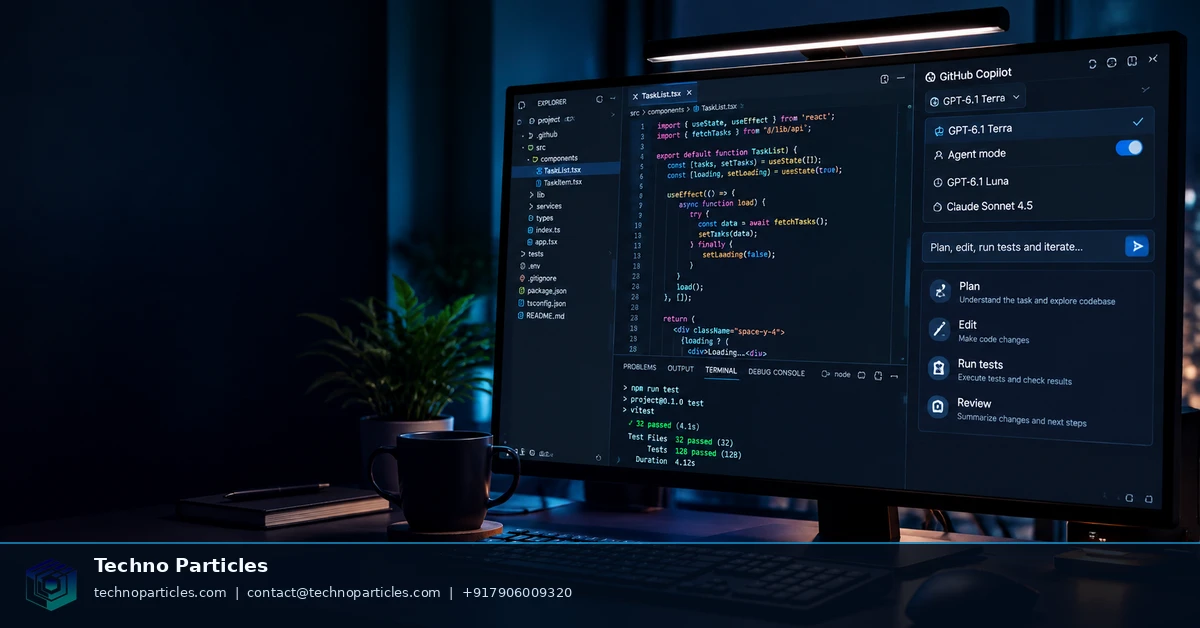
In Visual Studio Code, open Copilot Chat and use the current-model dropdown to choose GPT-6.1 Terra. If it is missing, check the signed-in account, subscription, client support, and any organization model policy. GitHub notes that Business and Enterprise administrators may control model access. Selecting Terra for Chat also does not change the model powering inline code suggestions.
The practical starting point is a contained task, such as implementing a clearly described feature, updating related tests, or diagnosing a reproducible terminal error. Keep the requested scope explicit and review every generated change before merging.
How to use GPT-6.1 Terra for agentic coding tasks
After selecting Terra, give Copilot a task with a clear outcome, repository location, constraints, and acceptance checks. For example, ask it to trace a failing API request, identify the responsible files, propose a small fix, update the relevant tests, and explain the commands it ran. This structure gives the model a sequence to follow while keeping the change reviewable.
Terra is most useful when the work involves connected steps rather than a single autocomplete. It can help inspect a codebase, reason about dependencies, edit multiple files, and use terminal tooling as part of the investigation. That makes it a practical option for maintenance, test updates, configuration changes, and narrowly defined feature work within a broader application-development workflow.
Set boundaries before letting Copilot act
State which directories may change, which commands are safe to run, and what must remain untouched. Ask for a plan before implementation when the task crosses several components. For database, authentication, payment, deployment, or security-sensitive changes, require a human checkpoint before any irreversible action.
Review the resulting diff, test output, dependency changes, and terminal commands—not only the final explanation. A successful command does not prove that the implementation is correct, compatible, or safe for production. GitHub’s documentation advises reviewing and validating generated code, and that remains important even when a model appears confident.
When to compare Terra with another Copilot model
Use a second model when the task has ambiguous requirements, unusual framework behavior, large architectural consequences, or inconsistent test results. Compare concrete outputs: correctness, number of revisions, test quality, latency, and credit consumption. OpenAI’s benchmark claims can provide context, but they do not predict performance on every repository. A short, controlled trial on representative issues is more useful than assuming one model is always fastest or most accurate.
Manage rollout, billing, and organization access
GPT-6.1 Terra may be generally available without being visible everywhere at once. GitHub is rolling access out gradually, and the result can depend on your Copilot plan, client, account, and organization settings. If the model picker does not show Terra, confirm that the signed-in account belongs to an eligible Copilot Pro, Pro+, Max, Business, or Enterprise plan and that the client supports the model.
Business and Enterprise users may also face an administrator decision. Organization owners can use Copilot model policies to control which models members are allowed to select. That means an individual developer may have an eligible subscription but still need an administrator to enable access. For teams building a broader project-consultation process, documenting approved models and review requirements can prevent inconsistent development practices.
Understand Copilot usage before scaling Terra
GitHub states that Terra uses provider list pricing under Copilot’s usage-based billing system. Do not apply OpenAI API prices directly to a Copilot subscription: API pricing and Copilot billing are separate systems. The amount of AI credit consumed can also vary with the model and the task, while higher reasoning or larger-context features may use more credits where supported.
Before assigning Terra to a whole team, run a small evaluation using representative issues. Record whether it completes the task, how many corrections are needed, whether tests improve, and how much usage the work consumes. This gives a clearer operational baseline than relying on a headline benchmark or assuming that a model’s API characteristics map directly to the Copilot experience.
Keep the model choice separate from inline completion
Changing the model in Copilot Chat affects that Chat session, not necessarily the model behind inline suggestions. Developers should therefore test both workflows separately if they rely on chat-driven implementation and continuous autocomplete. A team may prefer Terra for repository-level investigations while using another available model for short suggestions, depending on access, credit usage, and observed code quality.
Measure Terra against the work your team actually ships
A useful evaluation should mirror your repository, not a synthetic coding exercise. Select a small set of completed issues that represent recurring work, such as adding tests, resolving a build failure, refactoring a service, or updating configuration. Give Terra the same issue description, repository instructions, and acceptance criteria that a developer would receive, then compare the resulting diff with the original human solution or an independently reviewed baseline.
Track practical signals for each task: whether the agent identified the right files, how often its plan changed, whether tests covered the requested behavior, how many corrections were required, and whether its terminal actions stayed within the approved scope. Also record credit consumption and the time spent reviewing the result. These observations are more relevant to a team’s workflow than a single vendor-reported benchmark.
Use review gates for high-impact changes
Terra can help investigate and implement multi-step work, but repository permissions should reflect the risk of the task. Keep automatic changes limited for routine maintenance, and require explicit approval before modifying production configuration, access controls, payment logic, data migrations, or deployment files. Ask the agent to explain assumptions and identify unresolved failures so reviewers can focus on decisions that need human judgment.
Teams can formalize this process through an internal project-consultation workflow that records approved model usage, review ownership, test requirements, and escalation rules. The goal is not to select Terra permanently after one successful task. It is to determine where its agentic workflow reduces effort without weakening code review, security checks, or accountability.
Make the choice based on evidence
For well-scoped repository tasks, GPT-6.1 Terra is worth testing when it is available in your Copilot environment. Keep the experiment bounded, separate Chat behavior from inline completion, and judge the model by verified results on your own codebase. If another model produces fewer revisions or better tests for a particular workload, that evidence should guide the choice.
Build a controlled Terra trial
Start with tasks that have a clear definition of done and a testable outcome. Provide the repository’s existing instructions, relevant issue context, and required constraints, but avoid adding hints that would not be available in normal development. This makes the comparison meaningful and shows whether Terra can discover the implementation path rather than merely follow a prepared recipe.
Separate the trial into stages: ask Terra to inspect and propose a plan, review that plan before permitting edits, then evaluate the resulting diff and test output. Keep terminal access limited to the commands and directories required for the task. If the agent encounters repeated failures, begins changing unrelated files, or cannot explain a dependency, stop the run and record the reason instead of allowing more retries to inflate usage.
Capture evidence reviewers can audit
For each task, save the final diff, test results, correction count, elapsed review time, and notable tool actions. Note whether Terra reused existing patterns, introduced unnecessary dependencies, or overlooked repository-specific conventions. A successful build alone is insufficient if the implementation increases maintenance risk or leaves important edge cases untested.
Use separate tasks for code changes, debugging, documentation, and terminal-heavy maintenance. A model that performs well on a focused refactor may behave differently when asked to trace a failing deployment or coordinate changes across services. This task-level view helps teams decide where GPT-6.1 Terra belongs in a broader project-consultation workflow without treating one result as a permanent ranking.
Review sensitive repository boundaries
Before a wider pilot, identify files and environments that should remain outside autonomous edits. Secrets, production credentials, billing rules, identity controls, and irreversible migration scripts deserve explicit human ownership. Require reviewers to confirm both the requested behavior and the absence of unintended changes before merging.
Choose Terra by task, not hype
The practical answer to how to use GPT-6.1 Terra in GitHub Copilot for agentic coding is to treat it as a controlled collaborator, not an unsupervised replacement for engineering judgment. Give it a bounded repository task, define the expected result, and make the validation path explicit before it begins editing.
Terra is most useful when the work involves several connected steps: locating relevant code, forming an implementation plan, using approved terminal commands, changing multiple files, and running tests. That does not make every task a good candidate. A tiny completion may be faster to write directly, while an ambiguous architectural change may benefit from a different model or a human-led design discussion first.
Turn a successful trial into a team rule
After several representative tasks, group the results by workload rather than declaring one overall winner. You may find that Terra is effective for repository exploration and multi-file maintenance, while another model is preferable for concise explanations, inline suggestions, or a specialized codebase. Record those distinctions in the team’s Copilot guidance so developers know which model to try and when to switch.
Keep the decision reversible. Model availability, billing behavior, client support, and administrative policies can change, so periodically recheck the settings that govern access and review whether the observed quality still justifies the usage. The evidence should come from accepted changes, reliable tests, manageable review effort, and safe tool behavior—not from a model label alone.
For developers experimenting today, the next step is simple: select GPT-6.1 Terra when it appears in the Copilot model picker, run it on a low-risk issue with a clear definition of done, and inspect every proposed change.



Leave a comment
Your email stays private. You can see your comment immediately on this browser. Others see it after approval.